AI
Cavalry (AI community manager)
Cavalry is an AI-powered community management platform that automates member onboarding, engagement, moderation, and support while providing insights into community sentiment and performance. It is designed to help businesses grow and manage online communities across platforms like Slack, Discord and more, efficiently.
- Role
- UI Design, Information Architecture, Research
- Duration
- 8 weeks
The Challenge
Community managers were running growing communities across Slack, Discord and other platforms almost entirely by hand: welcoming new members, answering the same questions again and again, keeping discussions on track and posting regularly to keep people engaged. As communities grew, that work stopped scaling. Responses slowed, members went quiet, and managers spent their time on busywork instead of building relationships.
AI could take on much of that load, but it raised a harder question: how do you let an AI speak on a community's behalf without losing the voice and trust the community was built on? On top of that, managers had no clear way to show the business what their community work was actually achieving.
The Goal
Design an intuitive AI-powered platform that helps community managers manage, automate, and grow their online communities while reducing how much manual they have to do and actually improve member engagement.
Scope of work
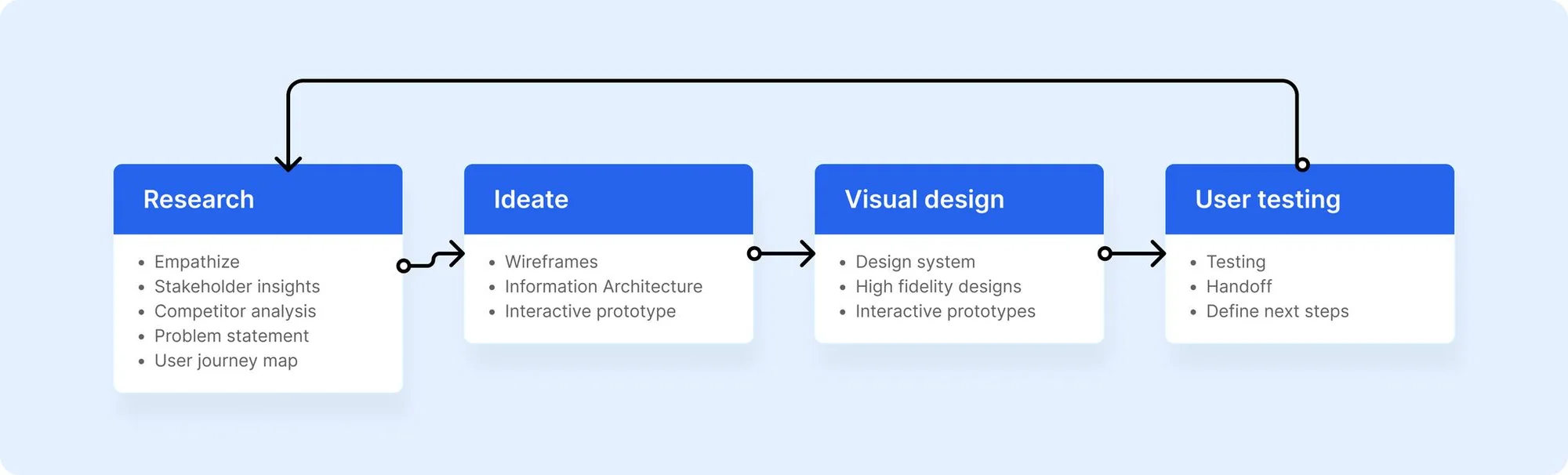
Step 1: Research
Research & Discovery
Before moving into design, I consider stakeholder interviews a valuable way to understand what the business actually needs to succeed, not just what the end user wants, but where the constraints, priorities, and trade-offs really sit before a single pixel gets drawn. I facilitated discovery sessions with the Product Manager, Engineering Lead, and key stakeholders to align on Cavalry's business objectives.
Insights
- Stakeholder interviews provided valuable input on the features and functionality that are most important to users, such as ways for moderating discussions, posting, and responding to conversations
- Align user needs, and technical constraints. These helped define the MVP scope, prioritize features, establish the success metrics, and the overall goal for Cavalry as a solution.
- Interviews with the Product Owner provided insights into company’s business objectives.
- interviews with engineering lead revealed technical considerations around implementing scalable AI models to handle varying community sizes and activities, how to ensure compatibility with various community platforms (Slack, reddit, others) and measures to ensure high standards of data security and privacy.
- These interviews also revealed the the data points that demonstrate the ROI of community management efforts; like community health metrics, its impact on the business, growth metrics, engagement, and efficiency metrics.
Competitor Analysis
To validate scope decisions and identify where Cavalry could differentiate, I looked at how comparable tools in the space approached automating community management.
| Company | Strengths | Weaknesses |
|---|---|---|
| Sprinklr | Strong focus on integrating community management into a broader customer experience platform. It offers advanced tools for community and social media managers, enabling real-time customer satisfaction tracking and feedback analysis. | Primarily geared towards customer support rather than marketing or community engagement, which limits its appeal to communities focused on brand interaction and engagement |
| TeamSmart | Offers customizable AI agents that can be tailored to different social media tactics. It is flexible, allowing for bring-your-own-key billing, which could appeal to tech-savvy users. | The platform lacks polish and credibility, with a slow website and low pricing that could undermine trust. It also relies heavily on GPT, which might not differentiate it enough in a competitive market. |
| Glueup | Comprehensive platform with CRM, event management, memberships, and email campaigns. AI Copilot is integrated into a larger ecosystem, which could be attractive to organizations looking for an all-in-one solution. | Community management is not the primary focus, and the AI Copilot seems to be more about content generation rather than deep community engagement. |
| Disco | Strong Slack integration with personalized configurations for channels and responses. The platform also supports both AI and human community management, making it versatile. | Disco’s features seem focused on moderation and task management rather than full-scale community engagement. It may be limited by its reliance on Slack and its basic AI capabilities. |
| Thena | Integrates with tools like Slack, Zendesk, and others for seamless collaboration. It also boasts significant clients like Amplitude and Vercel, which adds credibility. | Although it touches on community management, its primary focus remains on customer support and success, making it less of a direct competitor in the community management space. |
Summary & Strategic Positioning
- Gaps in the Market: Most competitors focus on either customer support or basic content management, leaving a gap for a product that truly excels in AI-driven community engagement and growth.
- Key Differentiators for Cavalry:
- Proactive Engagement: Instead of just moderating or managing content, your AI could drive community growth by actively engaging members and fostering relationships.
- Integrated Identity Management: Introducing features that connect user activity across platforms (e.g., Slack, social media) would provide a more holistic view of community members, enhancing personalization and engagement.
- Sophisticated AI Insights: Offering AI that not only suggests responses but also provides deep insights into community dynamics, trends, and opportunities for growth would set your product apart.
Step 2: Ideate
Information architecture
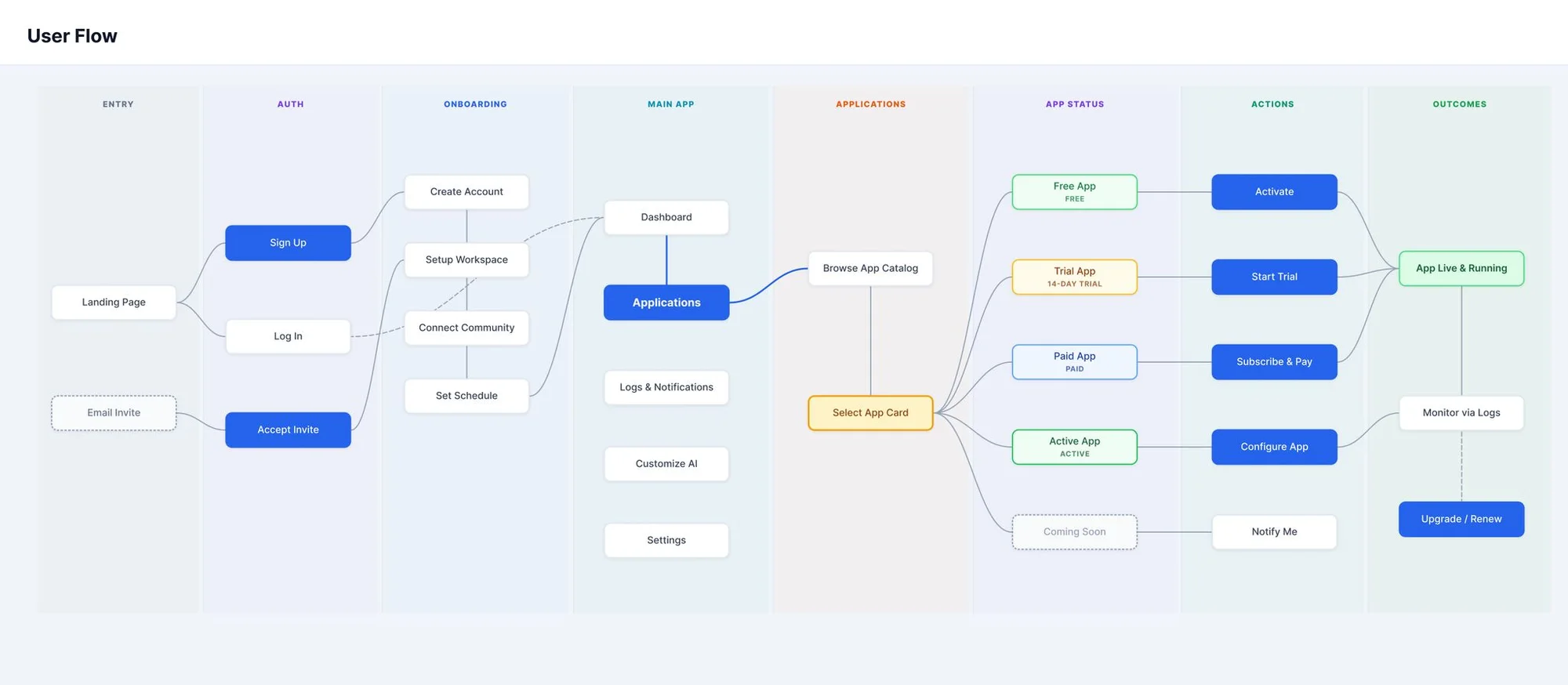
I structured the platform around two parallel hierarchies in the side navigation: system-level navigation (Main) and workspace-level navigation (My Communities), which reflects how the product actually gets used — most managers operate across multiple communities but need a single, unified view before drilling into any one of them.
Userflow
Wireframes
Step 3: Visual design
High-fidelity designs
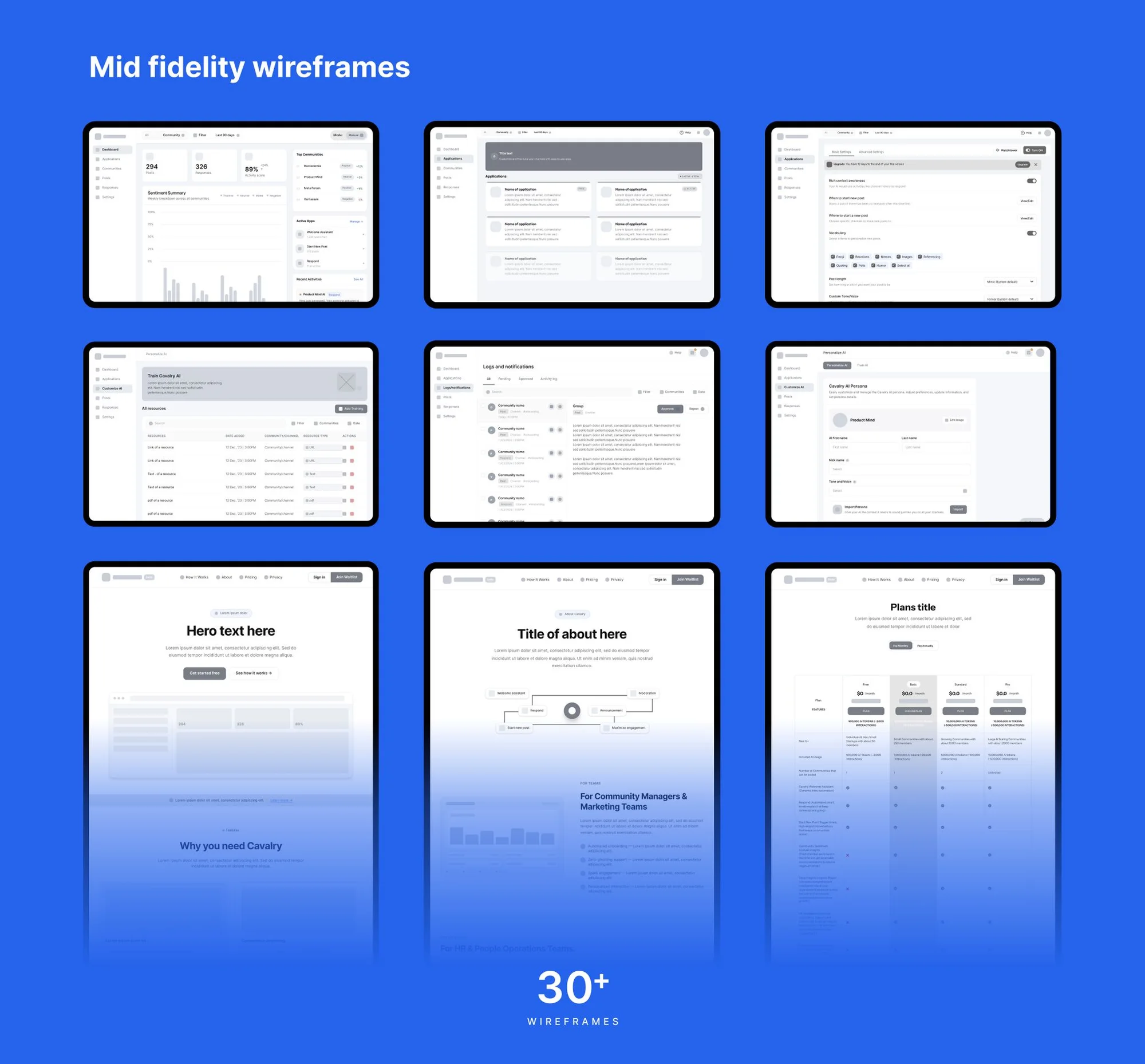
With the Information Architecture and flows validated, I moved into high-fidelity designs to answer the questions I tried to answer with the wireframes, questions like: will a community manager know what to do at a glance, how best should a manager train it’s AI manager?
Onboarding
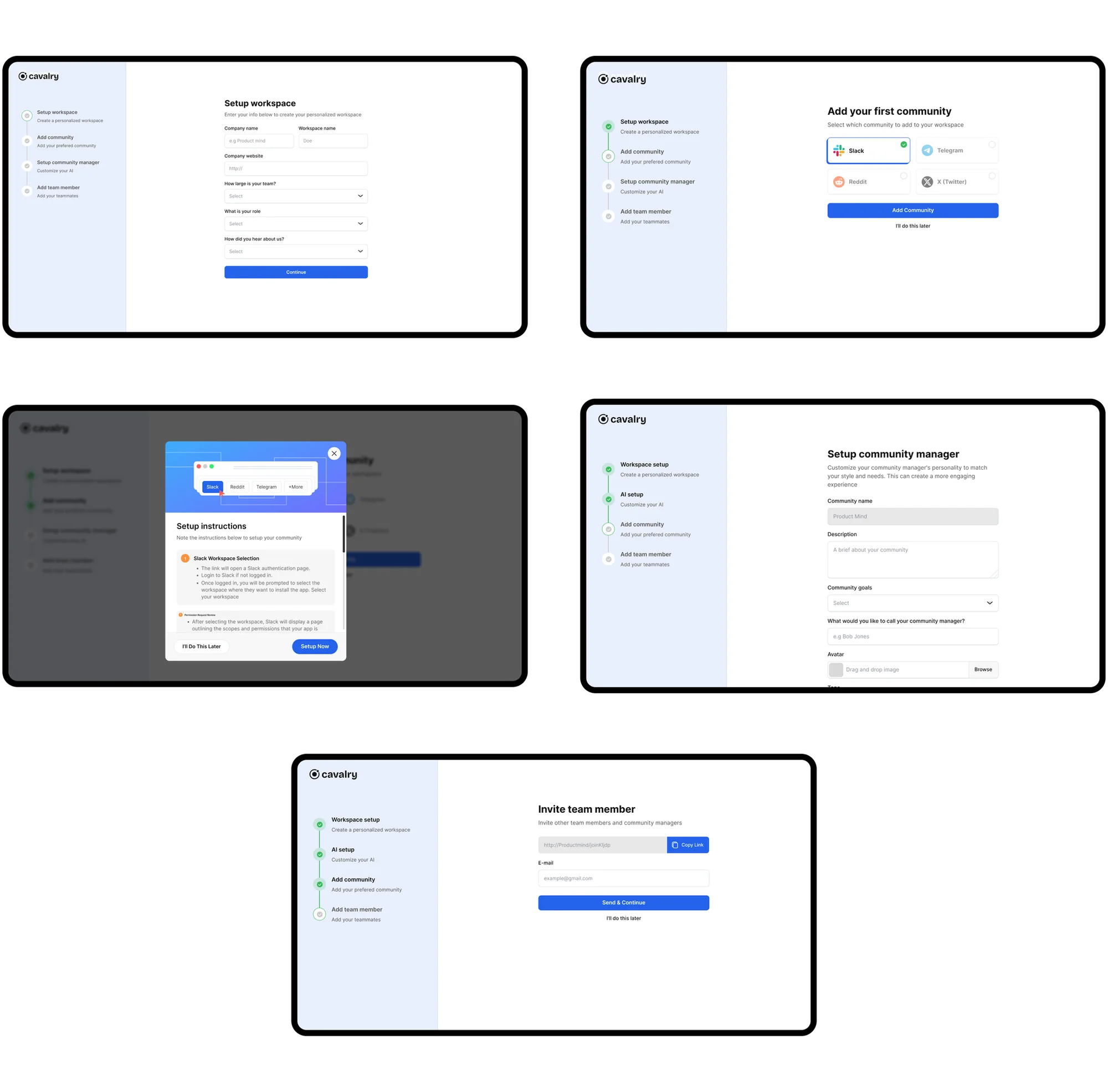
I designed onboarding in a four steps sequence to get users to first value as fast as possible without skipping the setup that makes the product actually useful.
The flow moves from account setup → community integration → configuration → team invite (optional): each step building directly on the last, so nothing feels like a detour. Integration comes early rather than being buried in settings, since connecting a real community is what turns the dashboard from an empty state into something meaningful on first login.
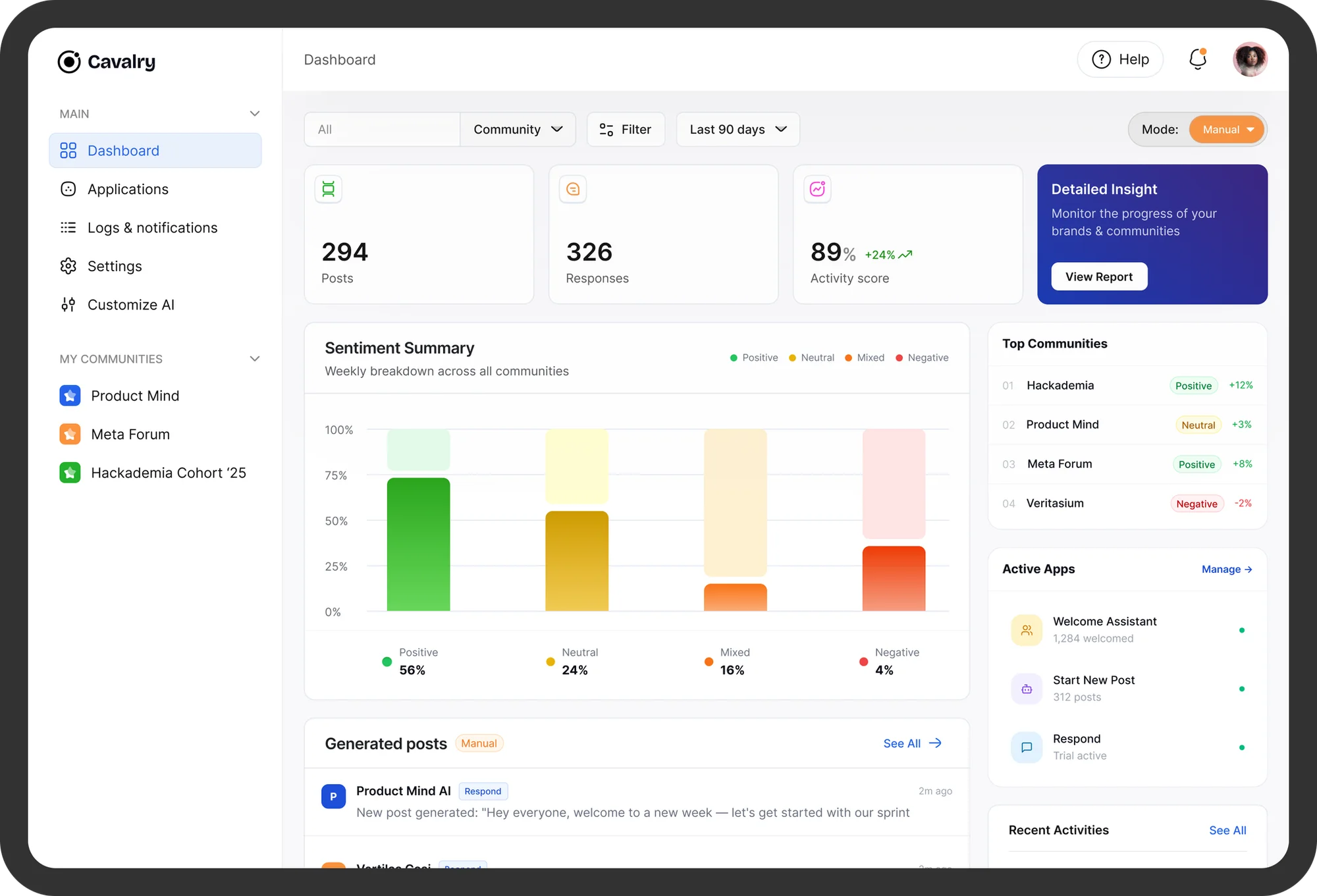
The dashboard home
This is where the Community manager see’s an overview of how the communities are performing and track progress.
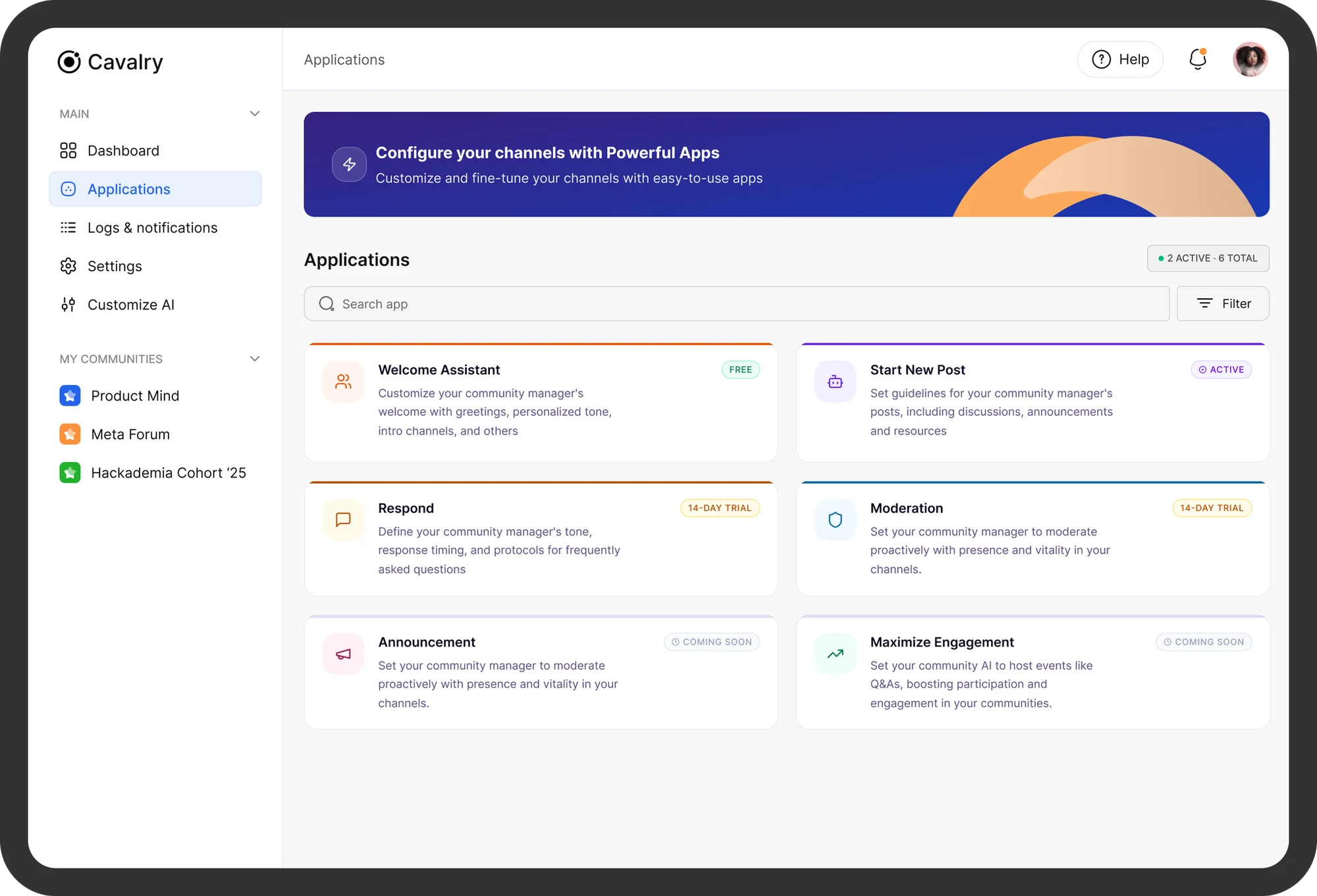
Applications
Here, users have access to a library of tools they can add on top of the core platform to expand what their AI manager can actually do for community growth and engagement.
I separated Applications from Settings deliberately: Settings is about configuring what already exists, while Applications is about discovery and expansion.
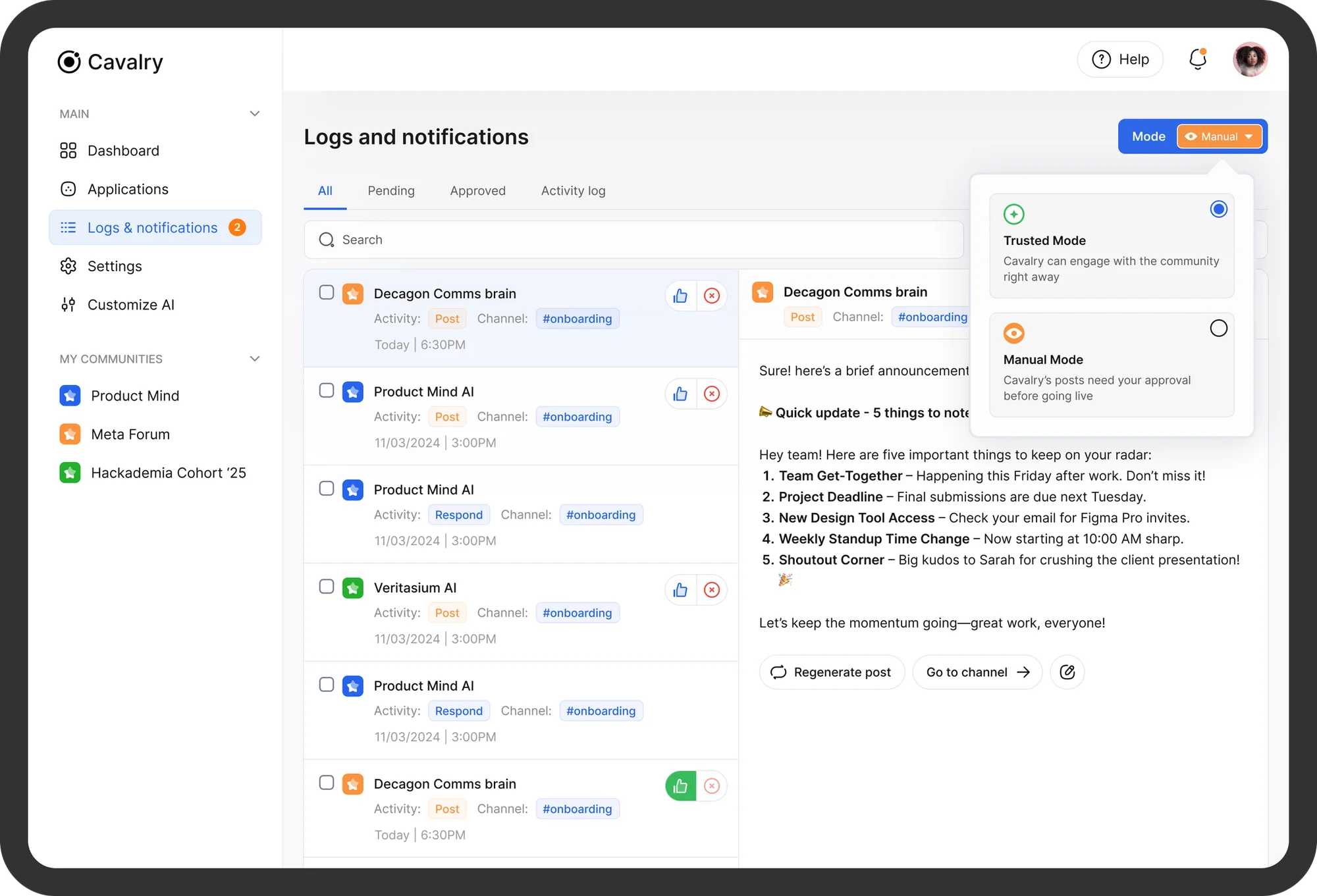
Logs & notifications
This is the accountability layer of the product; every conversation and post the AI manager generates is logged here, giving users a full trail of what's been said on their behalf.
The core design decision was giving users a choice in how much control they want over that trail: they can review and approve each post manually (Manual Mode), or trust (Trusted Mode) the AI once they've provided enough context and let it act autonomously.
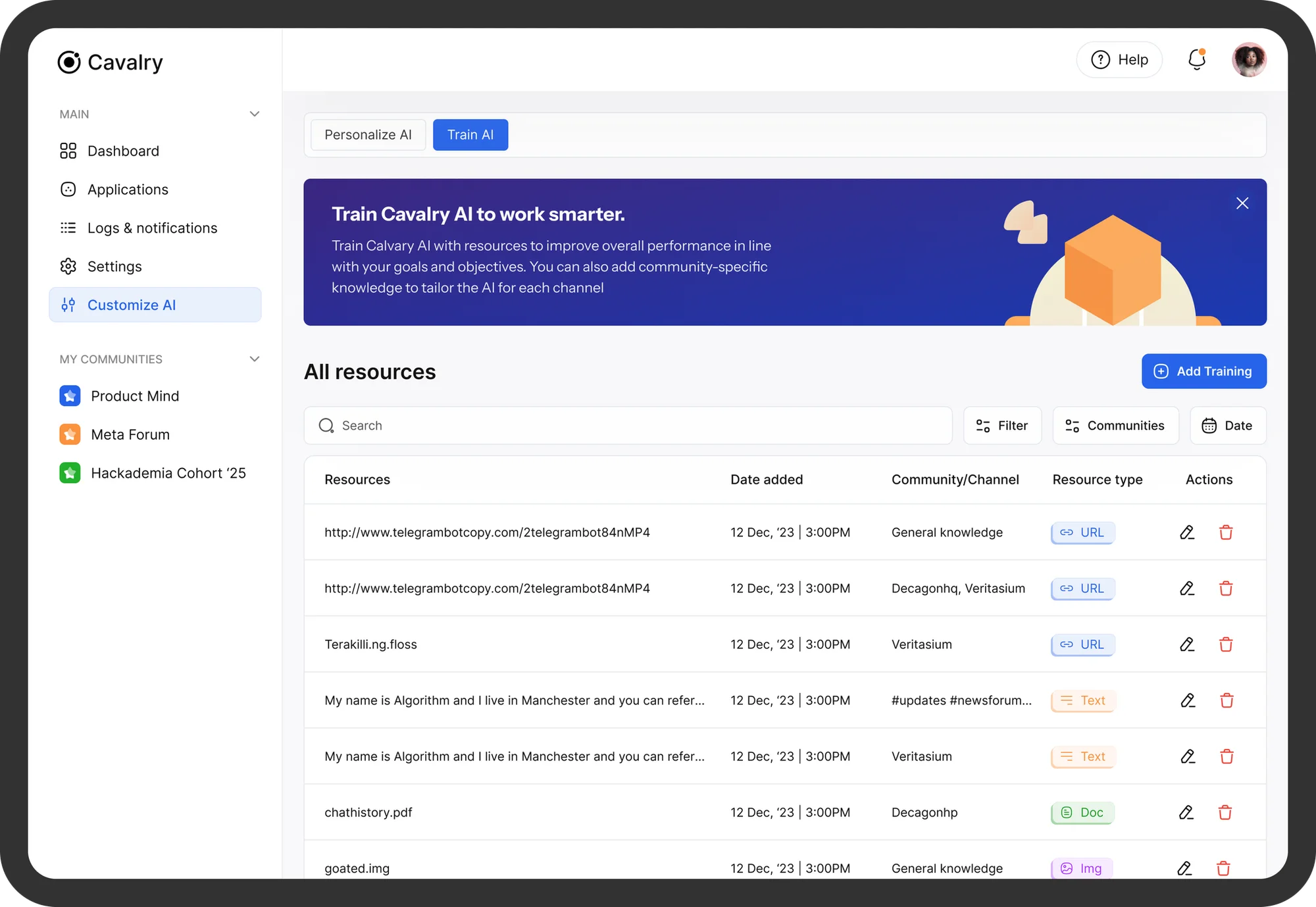
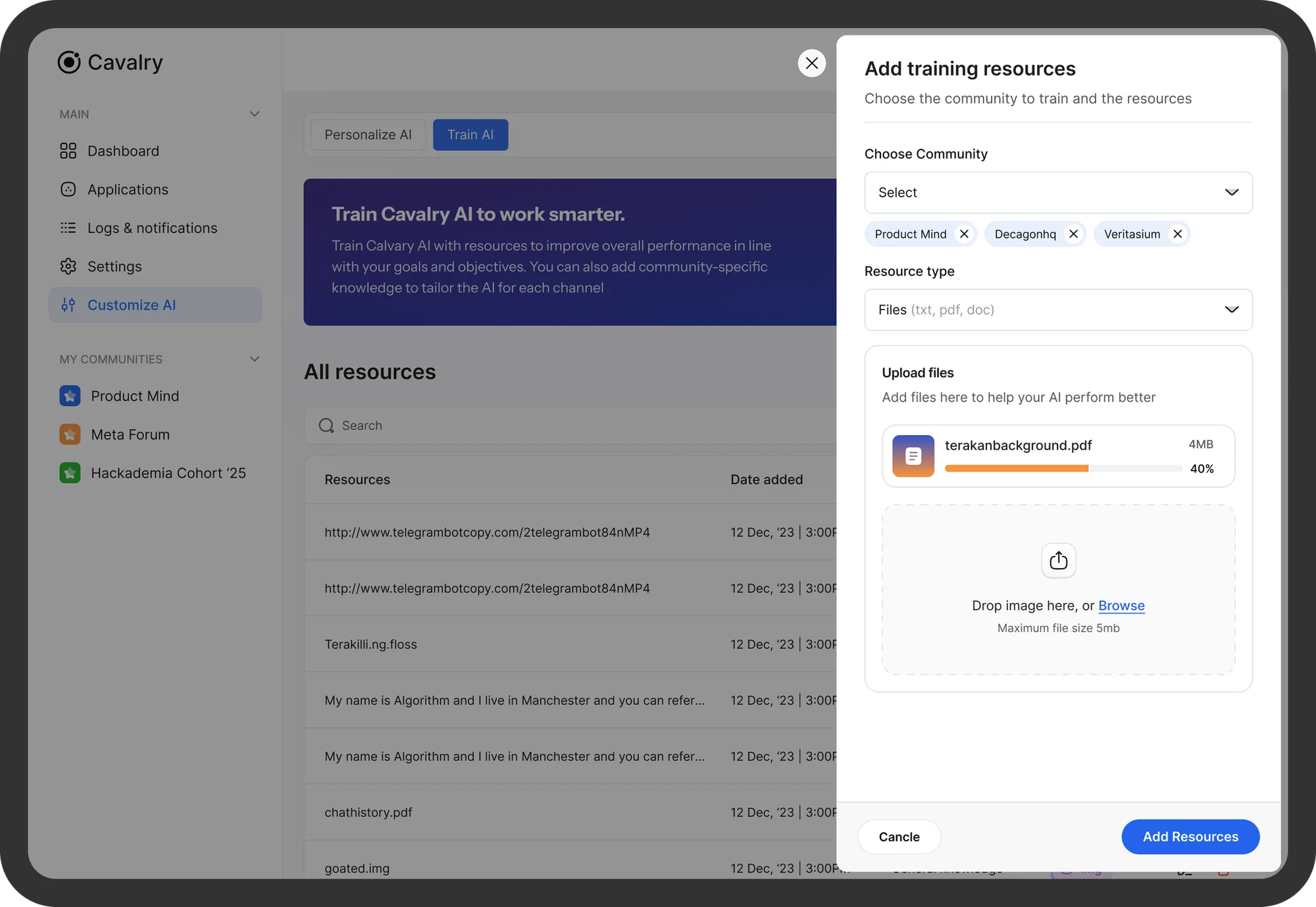
Train AI
This is where users shape how their AI manager actually sounds and behaves, feeding it context, in form of images, files, links and knowledge specific to their community so its posts and responses read as authentically theirs, not generic AI output.
Step 4: Testing
Testing
Prior to launch, user testings were carried out with the objectives:
- To evaluate the usability of the Cavalry web-app
- To identify any issues or pain points that may prevent users from effectively using the product to manage their communities
Scenarios
- Onboarding and connecting a community
- Training AI
- Customizing AI, (with focus on language of communication)
Outcome
Cavalry's design centered on one problem: earning a community manager's trust in an AI acting on their behalf and the result is a product that doesn't just automate community management, but lets automation earn its way in, one reviewed post at a time.
Next project
Naipay
Designing a simple, trustworthy mobile banking app for the underserved and unbanked population in Nigeria.